SPF PermError: How to Fix the 10 DNS Lookup Limit
Your SPF record looks fine, but email authentication keeps returning PermError. The problem may be buried in the nested DNS lookups used by your email providers. Here's how to find the cause, reduce the lookup count and safely verify the fix.

You've added a new email service to your domain. The DNS changes look right, your SPF record exists, and everything appears to be configured correctly.
Then the delivery problems begin.
Some messages arrive without any trouble. Others get rejected. You run an SPF check and find an error that says:
SPF PermError: Too many DNS lookups
At first glance, it doesn't make much sense. Your SPF record might only contain four or five include: statements. Surely that's under the limit?
Unfortunately, SPF doesn't work quite that simply.
The 10 DNS lookup limit applies to the entire evaluation, including lookups hidden inside other SPF records.
A record that looks perfectly reasonable can exceed the limit because one or more of your email providers reference additional domains behind the scenes.
The good news is that this is usually fixable without rebuilding your email configuration.
Let's work through how to identify the problem and clean things up safely.
What is SPF PermError?
Sender Policy Framework (SPF) is an email authentication mechanism that allows domain owners to specify which servers are authorised to send mail for their domains.
When a receiving mail server gets a message, it can look up the SPF policy for the message's envelope-sender domain and compare the connecting IP address with the authorised sources.
If the server is authorised, SPF can return pass.
If it isn't, the outcome depends on the policy.
But SPF can also return permerror.
This means the receiving server encountered a permanent problem while trying to evaluate the SPF policy.
Common causes include:
- Exceeding the 10 DNS lookup limit.
- Publishing multiple SPF records for the same DNS name.
- Invalid SPF syntax.
- An
include:reference pointing to a domain without a usable SPF record. - Other invalid or excessive evaluation conditions.
A permerror doesn't necessarily mean the sending server was unauthorised. It means the receiver couldn't complete a valid SPF evaluation.
That's an important difference.
Some receiving systems may reject the message, while others apply their own authentication and filtering policies.
For this guide, we're concentrating on the most common scaling problem: too many DNS lookups.
Why does SPF have a 10 DNS lookup limit?
SPF records can instruct receiving servers to perform additional DNS lookups.
For example, your policy might authorise Microsoft 365, a marketing platform and a helpdesk provider.
Each of those services may publish its own SPF policy, which can reference still more domains.
Without limits, evaluating one email could trigger a long sequence of DNS requests.
That would increase processing costs and create opportunities to overload receiving infrastructure.
To prevent this, RFC 7208, Section 4.6.4 establishes a maximum of 10 DNS-query-triggering SPF terms per evaluation.
When evaluating an 11th such term becomes necessary, the receiving server must return permerror.
Which SPF mechanisms count?
These count towards the limit:
include:— Evaluates another domain's SPF policy.a— Checks IP addresses associated with a hostname.mx— Checks mail exchanger hosts.exists— Checks whether a DNS name has an address record.ptr— Performs reverse-DNS-based matching; its use is discouraged.redirect=— Transfers SPF evaluation to another domain's policy when applicable.
These do not count towards the 10-term limit:
ip4:— Authorises an IPv4 address or range directly.ip6:— Authorises an IPv6 address or range directly.all— Matches any remaining sender and returns a result based on its qualifier.
The exp modifier is also excluded from this particular limit because its lookup happens separately when generating a failure explanation.
One technical point worth understanding: the limit isn't simply a count of every low-level DNS packet or query made by a resolver.
It is a limit on specific SPF mechanisms and modifiers being evaluated. The specification also defines additional resource limits for certain mechanisms.
The hidden problem: Nested SPF includes
Here's where things tend to catch administrators out.
Imagine your domain has the following SPF record:
v=spf1 include:mailer-a.example include:mailer-b.example ~all
At first glance, that looks harmless.
There are only two include: mechanisms.
But imagine the first provider's SPF record contains four further lookups, and the second provider's record contains five.
The evaluation could look like this:
| SPF evaluation | Cumulative count |
|---|---|
| Include Provider A | 1 |
| Four nested terms inside Provider A | 5 |
| Include Provider B | 6 |
| Five nested terms inside Provider B | 11 |
The total has reached 11, so SPF returns PermError.
This example is illustrative. The .example domains are placeholders, not actual email provider configurations.
There's another detail: SPF is evaluated in order, and processing can stop as soon as a matching mechanism produces the result.
If Provider A authorises the sender, the later Provider B terms may never be evaluated.
If Provider A doesn't authorise the sender, evaluation can continue into Provider B, potentially exceeding the limit.
That's why you may encounter situations where one legitimate sending service works while another causes authentication failures.
It also explains why simply counting the visible include: entries is unreliable.
Step 1: Check your SPF record with NetworkUtils
Before changing anything, establish what is currently published.
Open the free NetworkUtils SPF Checker.
Enter the domain you want to inspect and run the check.
The tool retrieves the SPF policy, follows nested include: and redirect references and analyses the DNS lookup count.
Start by reviewing:
- The full published SPF record.
- The number of lookups reported.
- Any warnings about excessive or invalid mechanisms.
- The included provider domains.
- Whether the policy contains obsolete or duplicated entries.
If the checker identifies excessive lookups, you've got a much more useful starting point than the original bounce message.
A lookup count alone doesn't always identify which sending paths fail. The exact evaluation can depend on the sender's IP address and which mechanisms match.
Use the tool's analysis to identify the record's complexity, then confirm actual failures against sending logs or message authentication results.
If the record appears valid but email is still failing, investigate other causes rather than assuming the lookup limit must be responsible.
Step 2: Retrieve the SPF record manually
It's worth knowing how to check the underlying DNS record yourself.
You don't need any special software beyond standard DNS utilities.
Windows PowerShell
Run:
Resolve-DnsName example.com -Type TXT
Linux or macOS
Run:
dig +short TXT example.com
Replace example.com with your sending domain.
Look for the TXT record beginning with:
v=spf1
Your domain may publish several TXT records for unrelated services. That is normal.
What you shouldn't have is more than one SPF policy beginning with v=spf1 at the same DNS name.
For example, these two separate records are incorrect:
v=spf1 include:provider-a.example ~all
v=spf1 include:provider-b.example ~all
They need to be combined into one valid SPF policy, with its lookup count checked again.
Also note that a long SPF TXT record may be represented as several quoted character strings within a single DNS TXT record. That isn't the same as publishing multiple SPF records.
Inspect nested includes
If your SPF record contains:
include:provider-a.example
You can inspect that provider's policy using:
dig +short TXT provider-a.example
Repeat for any additional includes.
This helps you understand the chain of references.
However, manually following every nested record becomes tedious, especially when multiple providers are involved.
That's where an SPF checker that follows the include chain is particularly useful.
Step 3: Identify which email services you actually use
Before removing anything, work out which systems legitimately send email for your domain.
This sounds obvious, but in larger organisations it's often the hardest part.
A company might have:
- Microsoft 365 or Google Workspace for employee email.
- A CRM sending customer notifications.
- A marketing service distributing newsletters.
- A support platform sending ticket updates.
- An application sending invoices or password-reset emails.
- An old provider that nobody remembers using.
Over time, every new service can add another SPF include.
The record grows, but nobody removes the entries that are no longer needed.
Create a simple inventory showing the service, its owner, the domain used for sending and whether it's still active.
Don't delete a provider merely because its name is unfamiliar.
Check with the relevant system owner, review sending logs and examine DMARC aggregate reports where available.
An unnecessary include is an obvious candidate for removal, but an active service may need a different solution.
Step 4: Remove unused or duplicated SPF mechanisms
This should generally be your first corrective action.
If your SPF policy references a provider that no longer sends email, remove that entry once you've verified it isn't needed.
For example, imagine this fictional record:
v=spf1 include:current.example include:old.example ~all
If old.example is genuinely retired, the record might become:
v=spf1 include:current.example ~all
Again, these are examples, not production SPF policies.
Removing unused includes reduces unnecessary evaluations and simplifies future troubleshooting.
Review duplicated mechanisms as well.
There's no benefit in repeating the same include for the same domain, and redundant mechanisms can make the policy more difficult to maintain.
One caution: removing a provider from SPF can break legitimate mail if that provider is still sending.
Make a record of the original configuration and confirm the change against real sending systems.
Step 5: Consider moving services to dedicated sending subdomains
Sometimes every include in the SPF record is legitimate.
If several platforms send email for one domain, you may simply have too many services competing for the same SPF lookup budget.
One possible solution is to separate sending systems by domain or subdomain.
For example:
example.com— Corporate email.news.example.com— Marketing messages.alerts.example.com— Application notifications.
Each sending domain can have its own SPF policy.
This can make the configuration easier to manage and reduce the lookup requirements for individual sending paths.
But there's an important catch.
Creating a subdomain doesn't automatically move a service's SPF checks to that subdomain.
The sending platform needs to support and use the relevant domain in its envelope sender, often called the return-path or MAIL FROM domain.
You'll also need to consider DKIM signing and DMARC alignment with the visible From address.
Where the sending platform supports custom bounce domains or branded return-path domains, configuring them properly can be an effective solution.
For a broader explanation of these mechanisms, read our SPF, DKIM and DMARC guide.
Step 6: Should you flatten your SPF record?
SPF flattening is frequently suggested as a quick fix for excessive DNS lookups.
The idea is straightforward.
Instead of referencing a provider through an include: statement, you replace the reference with the IP addresses or ranges currently authorised by that provider.
Because ip4: and ip6: terms don't count towards the 10-lookup limit, this can reduce evaluation complexity.
For example, an illustrative authorisation might look like:
v=spf1 ip4:192.0.2.0/24 ~all
The IP range above is reserved for documentation. It isn't a real sending-service configuration.
Why flattening isn't always the best solution
The problem is maintenance.
Many cloud email providers change their sending IP addresses.
A flattened policy captures a particular set of addresses. If those addresses change and the SPF record isn't updated, legitimate mail may start failing authentication.
Microsoft specifically advises against flattening its include:spf.protection.outlook.com record because its sending infrastructure uses dynamic IP addresses.
Flattening may be reasonable for providers with stable, documented IP ranges, provided you have a process for monitoring and updating them.
But it shouldn't be your automatic first response.
Before flattening anything, try removing unused services, consolidating unnecessary entries and using dedicated sending domains where appropriate.
If you do flatten a stable provider, document the change and arrange regular reviews.
An SPF record that works today but silently becomes outdated next month isn't much of a fix.
Step 7: Check for other PermError causes
If your lookup count is within the permitted limit but SPF still returns permerror, don't assume the checker is wrong.
There are several other possibilities.
Multiple SPF records: Two SPF policies at the same DNS name cause a permanent error.
Invalid syntax: An incorrectly formatted mechanism or unsupported structure can invalidate the policy.
Broken include targets: If an include: references a domain that doesn't provide a usable SPF policy, evaluation can return permerror.
Excessive void lookups: DNS queries returning no usable records or nonexistent domains can trigger additional implementation limits. RFC 7208 recommends a limit of two void lookups.
These are separate problems from simply reaching the 10-term limit.
It's also worth distinguishing permerror from temperror.
A temporary DNS failure can produce temperror, which isn't the same as an invalid SPF policy.
The exact error matters, particularly when troubleshooting intermittent delivery problems.
For more examples of common authentication failures, see our SPF, DKIM and DMARC Checker guide.
Step 8: Publish the corrected SPF record and test again
Once you've identified the unnecessary or excessive lookups, prepare the corrected record.
Before publishing it:
- Keep a copy of the original SPF policy.
- Confirm that every legitimate sending service remains authorised.
- Check that the revised policy is syntactically valid.
- Make sure there is only one SPF record at the DNS name.
- Validate the lookup count, including nested references.
Publish the change through your DNS provider.
Then run the NetworkUtils SPF Checker again.
Allow for DNS caching. Some recursive resolvers may continue returning the previous record until its TTL expires.
After the change becomes visible, send test messages from each legitimate email service.
Don't just test your main corporate mailbox.
The marketing platform, support system and application servers should all be tested independently.
Inspect their authentication results where possible.
A successful SPF result is useful, but remember that DMARC also depends on domain alignment. A message may pass SPF and still fail DMARC if the authenticated domain doesn't align with the visible From domain.
You can check the published DMARC policy using the NetworkUtils DMARC Checker.
How to prevent SPF PermError from returning
Once the problem is fixed, it's tempting to forget about it.
But SPF records tend to grow over time.
The next marketing platform, CRM integration or cloud migration can put you right back where you started.
A few habits make a real difference:
- Check the SPF lookup count before onboarding another sending platform.
- Keep a current list of authorised sending systems.
- Remove obsolete providers after confirming they're no longer used.
- Review nested includes when vendors change their email infrastructure.
- Consider separate sending domains for independent platforms.
- Monitor email authentication results and investigate unusual failures.
You don't necessarily need a complicated monitoring platform.
Even a scheduled SPF review can identify problems before they turn into customer complaints.
Final thoughts
SPF PermError is one of those email problems that can look far more complicated than it really is.
The DNS record exists. The syntax looks reasonable. Your provider says everything is configured correctly.
But an SPF policy isn't just the line of text you published.
It also includes the additional policies that line tells receiving servers to evaluate.
That's why a few innocent-looking include: statements can eventually produce an 11th lookup and a permanent error.
The most reliable fix is usually to understand the full evaluation, remove unnecessary complexity and verify every legitimate sending service afterwards.
Start with the free NetworkUtils SPF Checker to inspect the record and identify excessive lookups.
A few minutes checking the complete policy can save hours investigating bounced email later.
Technical references
- RFC 7208 — Sender Policy Framework, Section 4.6.4
- Microsoft Learn — Configure SPF for Microsoft 365
- Google Workspace — Troubleshoot SPF Issues
- Google Workspace — Set Up SPF
Technical review: 12 November 2026.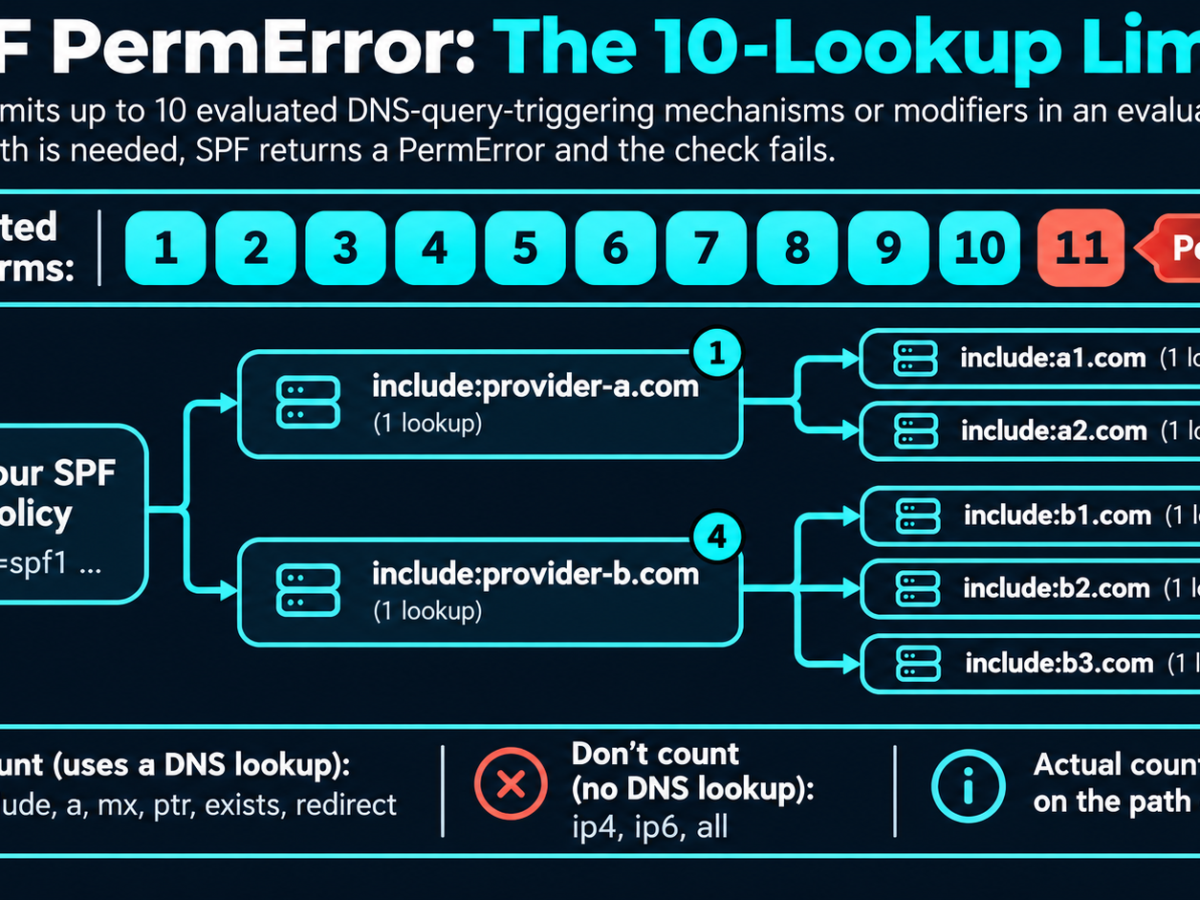
Key takeaways
- SPF permits a maximum of 10 DNS-query-triggering terms during an evaluation; exceeding the limit returns PermError.
- Nested include mechanisms count towards the limit, even when your main SPF record contains only a few includes.
- The exact lookup count can vary depending on the sending IP address and which SPF mechanisms are evaluated.
- Remove unused sending services and duplicate mechanisms before considering more complicated solutions.
- SPF flattening can reduce lookups, but static IP lists are risky for providers with frequently changing infrastructure.
- After updating SPF, test every legitimate sending service and verify actual authentication results.
FAQ
FAQ 1. What causes SPF PermError?
SPF PermError occurs when a receiving server encounters a permanent problem evaluating an SPF policy. Common causes include exceeding the 10 DNS lookup limit, multiple SPF records, invalid syntax or a broken include reference. The exact error determines which issue needs fixing.
FAQ 2. How many DNS lookups are allowed in SPF?
RFC 7208 allows up to 10 DNS-query-triggering SPF terms per evaluation. These include include, a, mx, ptr, exists and redirect. Nested mechanisms count towards the same limit, while ip4, ip6 and all do not.
FAQ 3. How do I fix SPF too many DNS lookups?
Start by checking the full SPF policy, including nested includes. Remove obsolete sending services, consolidate duplicated mechanisms and consider dedicated sending subdomains. Only flatten records when the provider's IP addresses are stable and you can maintain them safely.
FAQ 4. Does SPF flattening permanently solve the problem?
Not necessarily. Flattening replaces DNS-dependent mechanisms with IP address ranges. This reduces lookup requirements, but the IP addresses can change. Without regular updates, a flattened record can become outdated and cause legitimate mail to fail authentication.
FAQ 5. Can SPF PermError happen with fewer than 10 includes?
Yes. An include mechanism can reference another SPF record containing additional DNS-dependent mechanisms. Those nested lookups contribute to the same evaluation limit. Four visible includes can therefore require more than 10 lookups in total.
Last updated November 13, 2026
Reviews & Recommendations
Community feedback on this article. All submissions are moderated before publication.
Loading feedback…
Related articles
Continue reading with these guides from the networkutils.org blog.
Try the related tools
Put the concepts in this guide into practice with these live diagnostic tools.